



This section describes using the Field of Heroes Creator Kit for the very first time.
Prerequisites
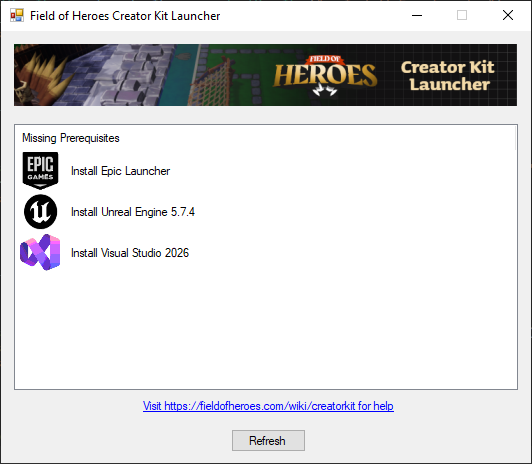
Before you can run the Field of Heroes Creator Kit, the Field of Heroes Creator Kit Launcher checks to see whether you have the following installed, and helps you install them:
Epic Games Launcher
This is required to uninstall Unreal Engine 5.7.4. You may download and install the Epic Games Launcher from https://store.epicgames.com/download .
Unreal Engine 5.7.4
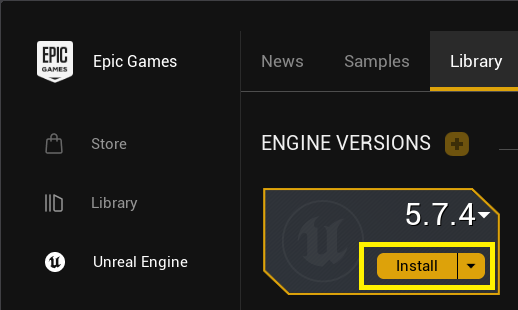
After the Epic Games Launcher is installed, use it to install Unreal Engine 5.7.4.
Visual Studio
Visual Studio contains tools necessary for you to run the Field of Heroes Creator Kit and also package mods. The Field of Heroes Creator Kit Launcher comes with an installer that does all the work for you in one click. The specific requirements that should be met include:
- Visual Studio 2022 or better for Desktop Development with C++
- .NET Framework 4.8.1 SDK
- .NET Framework 4.8.1 Targeting Pack
- MSVC Build Tools for x64/x86 (latest)
Initial Launch
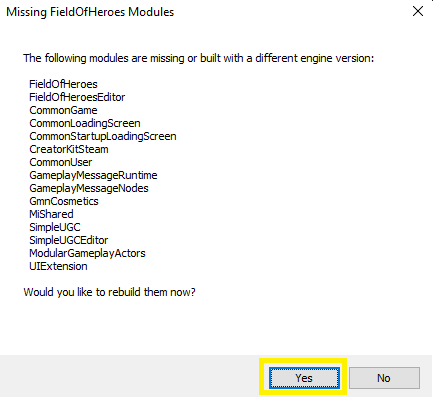
The first time you launch the Creator Kit, you will get a message that modules need to be built. Click Yes for this prompt, Otherwise the Creator Kit will not load properly.
Once the Creator Kit has fully loaded, read the section Creating a Mod.